
Fixing Indexing Confidence Using URL Inspection in Google Search Console
How Google’s URL Inspection Live Test actually works is something most site owners only look into once they’re already worried something’s broken. Somewhere in the middle of the recent work on this site, after rebuilding the internal SEO structure and running into the Core Web Vitals data gap I wrote about in the last post, I kept coming back to one specific check for building genuine indexing confidence in a page, more than any other tool inside Search Console. Not the Performance report, not the sitemap page. The URL Inspection tool, and specifically its Live Test feature.
I want to walk through what this tool actually checks, what a result like the one below is genuinely telling you, and the kind of work that tends to produce a clean result like this rather than a messy one. This isn’t a rescue story about a broken page getting fixed. It’s more useful than that, honestly, it’s what the tool looks like when things are actually working, and why that’s worth understanding properly instead of only paying attention when something’s wrong.
What the Live Test Actually Checks
Search Console’s URL Inspection tool has two different views that are easy to confuse. One is the Google Index view, which tells you what Google currently has stored about that URL from its last crawl, potentially days or weeks old. The other is the Live Test, which does something different entirely, it goes and checks the page right now, in real time, the way Googlebot would see it if it crawled that exact URL this second.
That distinction matters more than it sounds like it should. A page can look perfectly fine in the Google Index view simply because nothing’s changed since the last crawl, even if something’s currently broken. A Live Test cuts through that lag. It’s asking, right now, in this moment, can Google actually reach this page, render it properly, and consider it a candidate for indexing.
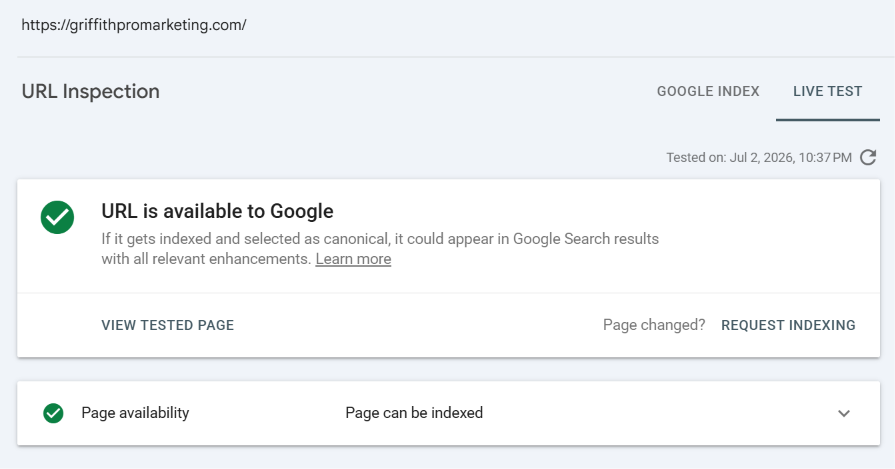
A Live Test run on the homepage, tested July 2, 2026. URL is available to Google, and page availability confirms it can be indexed.
What This Particular Result Is Actually Confirming
This is a clean pass, not a fix. Worth being upfront about that. “URL is available to Google” means Googlebot successfully reached the page without being blocked by anything, no robots.txt rule stopping it, no server error, no redirect chain causing problems. “Page can be indexed” means there’s nothing in the page’s own signals, no noindex tag, no canonical pointing somewhere else, actively telling Google to leave it out. Together, that’s what real indexing confidence looks like in practice, not a guess based on how the page appears to a person, but a direct answer from Google itself.
Those two things sound basic, and in a sense they are, but they’re also the exact things that quietly go wrong on a lot of sites without anyone noticing. A plugin update that accidentally sets a noindex tag site-wide. A caching rule that serves Googlebot a different, broken version of a page than what a real visitor sees. A canonical tag pointing at the wrong URL after a site migration. None of these show up to a human visitor browsing normally. They only show up here, in a Live Test, which is exactly why running one after making structural changes is worth doing as a habit, not just when something’s already gone wrong.
I’ve seen this go wrong on other sites in ways that make the point clearly. A client site once had a security plugin that, completely by accident, started blocking Googlebot’s user agent specifically while treating every other request normally. The site looked fine to every human who visited it. Search Console’s Live Test was the only place that discrepancy actually showed up, because it was testing exactly what Googlebot would see rather than what a browser would see. Without running that check, the gap between “looks fine” and “is actually reachable by Google” can sit unnoticed for months.
Why I Ran It At All
After the cluster rebuild, I’d changed titles, restructured internal links, added schema across ten articles and the pillar page, and touched the homepage’s own structure too. Any one of those changes could, in theory, introduce something that quietly breaks how Google sees a page even while it looks completely normal to a person reading it. A Live Test is the fastest way to rule that out page by page, rather than waiting to see whether something shows up wrong in the Performance report weeks later.
So this wasn’t diagnosing a known problem. It was verification, confirming that a page changed on purpose, rather than a page changed and something broke by accident. That’s a genuinely different use of the tool than most people think about, and honestly probably the more common legitimate use of it for anyone actively maintaining a site rather than just launching one.
The Trust Signals Behind a Clean Result
A Live Test passing isn’t random. It’s downstream of a handful of things being handled properly, and it’s worth naming what those actually are rather than treating a green checkmark as a black box.
Internal linking depth matters more than people expect here. A page buried five or six clicks deep in a site’s structure, with nothing else linking to it, is harder for Google to find and prioritise crawling, even if nothing is technically broken about the page itself. Part of the earlier rebuild work was making sure every article in the cluster sat within one or two clicks of the pillar page, which is really the same principle behind why service pages need proper internal linking to rank at all, a page Google has to work hard to even find gets deprioritised long before anyone thinks about its content quality.
Sitemap accuracy plays a role too. An XML sitemap that’s out of date, still listing old URLs or missing new ones, sends a mild but real signal that a site isn’t being actively maintained. I resubmitted the sitemap through Rank Math once the structural changes were live, since it handles sitemap generation automatically and keeps the last-modified dates accurate whenever a page actually changes, rather than needing that updated by hand every time.
Server response time is the one people least expect to matter here, but it genuinely does. Google allocates what’s effectively a crawl budget to every site, a rough sense of how much of it Google is willing to crawl in a given period, and that budget shrinks when a server is slow to respond. A site that takes several seconds to respond to each request gets crawled less thoroughly than one that responds quickly, simply because Googlebot is trying to be efficient with its own resources. This is one of the few places where a caching setup, something like WP Rocket, has an honest connection to crawling and indexing specifically, not just page speed for human visitors. Faster server responses mean Google can afford to crawl more of a site more often.
Why Mobile Matters More Than the Test Suggests
One detail that’s easy to miss when reading a Live Test result: Google indexes almost everything using mobile-first indexing now, meaning it’s the mobile version of a page Googlebot actually evaluates and uses to decide what gets indexed, not the desktop version, even though the desktop version might be what a site owner checks first out of habit.
That matters for this kind of check because a page can pass a desktop Live Test cleanly while having an entirely different, broken experience on mobile, a menu that doesn’t render, content hidden behind a script that fails on smaller screens, images that don’t load properly. None of that necessarily blocks indexing outright, but it can affect how Google interprets what the page actually offers. Worth remembering that “available to Google” and “renders identically well on the device Google actually uses to judge it” are related but not quite the same guarantee, and it’s worth spot checking the mobile rendering specifically every so often, not just trusting that if desktop looks fine, mobile does too.
How This Fits Alongside the Content Work
None of this replaces the actual content and structure work described in the rebuild post. A page can pass every technical check here, be perfectly crawlable, properly indexed, fast to respond, and still not rank well if the content itself is thin or the keyword targeting is off. Indexing confidence is the floor, not the ceiling. It’s the part that has to be true before anything else about a page’s quality even gets evaluated properly, which is exactly why it’s worth checking early and treating as a baseline rather than an afterthought once other work is already done.
Where the two do connect is in how much attention Google’s willing to give a site over time. A site that consistently passes these technical checks, has accurate sitemaps, responds quickly, and doesn’t waste crawl budget on broken or duplicate URLs tends to get crawled more frequently and more thoroughly than one that doesn’t. That extra crawl attention is what lets genuinely good content actually get evaluated and considered promptly, rather than sitting unindexed for longer than it should, waiting for a crawl that might not come around as often as it needs to.
The Resubmission Trap
There’s a habit worth warning against here, since it’s an easy mistake to make with good intentions. When a page isn’t indexing the way you’d like, the instinct is to keep clicking Request Indexing over and over, hoping repetition speeds things up.
It doesn’t. Search Console says this plainly in its own interface, submitting a page multiple times doesn’t change its position in the crawl queue or its priority. All repeated requests actually do is confirm you’re aware the page exists, which Google already knew the first time you asked. If a page genuinely isn’t indexing, the more useful move is running a Live Test to check whether something’s actually blocking it, fixing that specific thing if there is one, and then requesting indexing once, rather than treating the request button as a lever you can pull harder by pulling it more.
This connects back to something from the earlier Core Web Vitals piece too. A missing signal, whether that’s field performance data or a slow indexing pass, is rarely fixed by asking Google to try again faster. It’s fixed by addressing whatever’s actually causing the gap, more real traffic in that case, cleaner crawl signals in this one, and letting Google’s normal process catch up naturally.
What a Green Result Doesn’t Guarantee
Worth being honest about the limits of this too. A clean Live Test result means Google can access and index the page. It says nothing about how well that page will actually rank, how much traffic it’ll get, or how it compares to competitors covering the same topic. Indexing and ranking are two completely separate stages, a page being indexable is the minimum bar to even be considered, not a promise of visibility once it clears that bar.
It’s also worth noting Live Test results reflect a single moment in time. Running it again next week, after some other change, could come back different if something regresses. It’s not a one-time certificate that stays valid forever, more a spot check you can rerun any time you want a current answer rather than a stale one from the last scheduled crawl.
Why This Is Worth Checking Even When Nothing Seems Wrong
Most people only open URL Inspection when they’re already worried something’s broken. The more useful habit, at least based on what came out of doing this across an entire cluster rebuild, is running it after any structural change, new titles, new internal links, new schema, a plugin update, even a theme change, specifically to confirm nothing quietly regressed in the process. It takes under a minute per page and catches the kind of invisible problem that a normal visual check of the page would never reveal, since the page can look completely fine to a human while telling Googlebot something entirely different.