
Why My Site Had No Core Web Vitals Data (And What I Did Next)
While going through Search Console after the recent SEO rebuild on this site, I opened the Core Web Vitals report expecting to see a mobile and desktop score, good, needs improvement, or poor. Instead I got this.
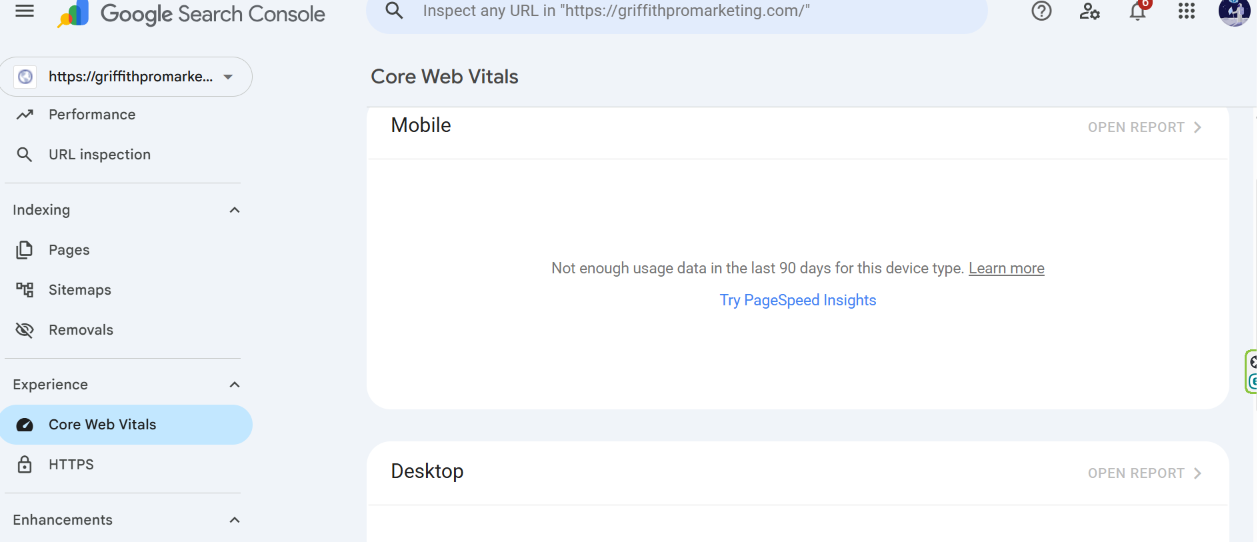
Mobile: not enough usage data in the last 90 days for this device type.
No score. No red, orange, or green. Just a note saying there wasn’t enough real-world usage to measure anything, and a suggestion to try PageSpeed Insights instead. The desktop panel underneath showed something similar.
My first reaction was the same one most site owners would have, a flicker of “is my site actually broken and Google just can’t tell me properly?” It isn’t, and once I looked into why this message shows up, it made a lot of sense. Worth writing up, since I don’t think this gets explained clearly very often.
Why This Message Shows Up At All
Google’s Core Web Vitals report in Search Console isn’t measuring your site directly. It’s pulling from something called the Chrome User Experience Report, real, anonymised data collected from actual visitors using Chrome who land on your pages. Google watches how fast those real visits load, how stable the layout is while loading, and how quickly the page responds to input, then aggregates all of that into the score you’d normally see.
That’s the part people miss. It’s not a lab test running against your site on demand. It’s built entirely from a rolling window of real visitor traffic, and Search Console specifically needs enough of that traffic to consider the sample statistically meaningful before it’ll show you anything at all.
If a site doesn’t get much real Chrome traffic in that window, there’s simply nothing for the report to aggregate. Not a bad score. Not a hidden problem. Just an empty data set. For a site that’s been going through a fairly deliberate SEO rebuild rather than running heavy paid traffic, that’s a completely plausible situation to be in, not a sign of anything wrong technically.
The Difference Between Field Data and Lab Data
This is worth understanding properly, because it explains why the “not enough data” message isn’t actually a dead end.
What Search Console shows is called field data, real visits, aggregated over time. What PageSpeed Insights runs when you plug a URL in directly is called lab data, a simulated test run right there on the spot, using a controlled connection speed and device profile rather than whatever mix of real visitors happened to show up.
Lab data doesn’t need any visitor history at all. It runs the moment you ask for it. So even with zero real-user data sitting in Search Console, I could still get an honest read on how the site actually performs technically, just from a simulated test instead of aggregated real-world visits.
What I Actually Checked
Rather than guessing, I ran the site’s key pages, the homepage, the pillar page, a couple of the higher-traffic cluster articles, through PageSpeed Insights directly. That gave me lab-based Core Web Vitals scores for each one, largest contentful paint, cumulative layout shift, interaction responsiveness, all the same metrics Search Console would eventually report, just generated on demand instead of aggregated from visitors.
The pages came back reasonably solid. Nothing dramatically broken, no severe layout shift, no alarmingly slow load times. That doesn’t mean the site is definitely fine in the real world, lab data and field data can genuinely diverge once real network conditions and real devices get involved, but it meant there was no obvious fire to put out either. If the lab scores had come back poor, that would have been a real, actionable signal regardless of the missing field data. They didn’t, so the honest read here really was data scarcity, not a hidden performance issue.
For a live example of exactly this kind of lab-based check in action, including the honest mobile-versus-desktop gap it uncovered, here’s the follow-up piece where I ran the same homepage through PageSpeed Insights again after installing WP Rocket.
Why the Real Fix Isn’t a Speed Fix
This is really the core of it. If I’d assumed the “not enough data” message meant something was broken, the instinct would have been to go looking for a technical fix, caching, image compression, script optimisation, that sort of thing. None of that would have actually solved the real issue here, because there wasn’t a performance problem to solve. There was a visibility problem.
The report needs real Chrome visitors before it can say anything at all, and the site simply hadn’t had enough of them yet in that window. Which loops back neatly into the rest of the work already going on here, the cluster rebuild, the internal linking cleanup, requesting reindexing on the pages that changed the most. All of that is aimed at getting more real, organic visitors finding these pages. As that traffic grows, this specific report will eventually have enough data to populate properly on its own, without anything else needing to change technically.
In other words, the fix for “no Core Web Vitals data” usually isn’t a Core Web Vitals fix. It’s whatever’s already being done to get more real visitors to the site in the first place.
The Unspoken Truth Behind This
A lot of small business websites see this exact same message and assume the worst, that Google’s flagging some hidden technical failure they can’t see. Realistically, plenty of small sites don’t have a performance problem at all. They have a data problem, not enough real traffic yet for Google to even attempt a proper diagnosis.
That’s an easy thing to mistake for a red flag if nobody explains what the report is actually built from. It isn’t one. It’s just Google being honest that it doesn’t have enough to go on yet, which is a very different thing from Google telling you something’s wrong.