
Rank Math Setup Checklist: Why It Still Might Not Be Enough
A diagnostic report, mid-July 2026
Three weeks ago I sat looking at Search Console for this exact site, Rank Math fully installed, every setting I thought mattered already configured, and rankings that simply weren’t moving. This is the actual investigation that followed, what I checked, in what order, what turned out to be nothing, and what turned out to be the real problem. The Rank Math setup checklist below isn’t a generic template I wrote for this post, it’s the literal list I worked through on my own site, in the order I worked through it.
The Setup That Looked Fine on Paper
I’d already been through Rank Math’s setup wizard properly, that part’s covered honestly in the setup walkthrough if you haven’t done it yet, this page picks up after that, not instead of it. Search Console was connected. The sitemap existed. Titles had a template. On paper, everything a “how to set up Rank Math” article tells you to do was already done.
And rankings still weren’t moving the way they should have been for a site with genuinely useful content sitting on it. That gap, between “I did the setup” and “it’s actually working,” is the part almost nobody writes about honestly, because admitting the checklist alone didn’t fix it undercuts the checklist. I’d rather undercut it and tell you what actually happened.
The numbers going into this: impressions in Search Console had been essentially flat for six weeks, average position sitting in the low 40s across the pages I actually cared about, and click-through predictably near zero at that position. Nothing dramatic, no penalty, no sudden drop, just a flat line where I expected a slope. Flat lines are almost harder to diagnose than crashes, because there’s no obvious event to point at, no single day where something clearly broke.
You’re on a small or newer site, your content itself is solid, and your technical foundation, speed, indexing, structure, is already in reasonable shape. Configuration is genuinely most of the work left to do.
You’ve configured everything below correctly and rankings still aren’t moving. At that point the bottleneck has usually shifted to something Rank Math was never built to touch, hosting, Core Web Vitals, or the site’s actual structure.
I genuinely didn’t know which side of that split I was on until I actually ran the audit, in order, rather than skimming settings and assuming they were fine because I’d clicked through them once months earlier.
The Rank Math Setup Checklist I Actually Used
Here’s the exact order I worked through it, split into three passes, the same three categories in the Rank Math setup checklist below. Tick as you go if you’re following along on your own site, it saves in your browser so you can come back and pick up where you left off.
First pass, and this is the one I was most confident about walking in. Two of these four were genuinely already right, the sitemap was submitted, the separator was set. The other two weren’t. My homepage title had quietly reverted to the generic default at some point, probably during a theme update months earlier, and I’d never gone back to check it since I “already did the setup.” That’s the whole trap in one sentence: setup isn’t a thing you do once, it’s a thing that can silently drift, and nothing tells you when it does.
Second pass, and this is where the real gap actually showed up. My schema types were technically set, in the sense that a value existed in the dropdown, but every single content type was set to the same generic Article schema, comparison posts, tool reviews, and straight editorial pieces all carrying identical markup. That’s not broken exactly, Rank Math won’t flag it as an error, but it’s a missed signal, Google had no clean way to tell a comparison article from a plain blog post from the schema alone. Fixing it took maybe twenty minutes. Noticing it took three weeks, because it never once threw an error to notice.
Third pass, and this is the one I almost skipped, because it felt like a “mistakes other people make” list rather than something that would apply to me. It applied to me. A handful of tag archive pages, leftover from an early tagging habit I’d since abandoned, were sitting indexed with two or three thin posts each, essentially duplicate content wearing a different URL. None of them were doing anything for rankings. All of them were quietly diluting crawl attention that could’ve gone to pages that actually mattered. Set to noindex, cleaned up, gone within a day of resubmitting the sitemap.
Eleven items, genuinely worked through rather than assumed. Two settings had drifted since the original setup. Every content type was carrying the wrong-shaped schema. A handful of old tag pages were quietly indexed and shouldn’t have been. None of that is dramatic. All of it is the kind of thing that sits there for months doing small, invisible damage, and none of it shows up as a red error anywhere in Rank Math’s own interface, which is exactly why it needs an actual audit rather than a glance.
What Rank Math Genuinely Doesn’t Fix
- Slow hosting or a genuinely slow server response time
- Poor Core Web Vitals caused by render-blocking assets, not structure
- A theme or page builder generating bloated, badly structured markup
Here’s where the investigation actually turned a corner. With all eleven items genuinely fixed, not skimmed, actually corrected, I gave it two full weeks of tracking before drawing any conclusion. Two weeks is enough to see real movement if the fix was the fix. Rankings barely shifted.
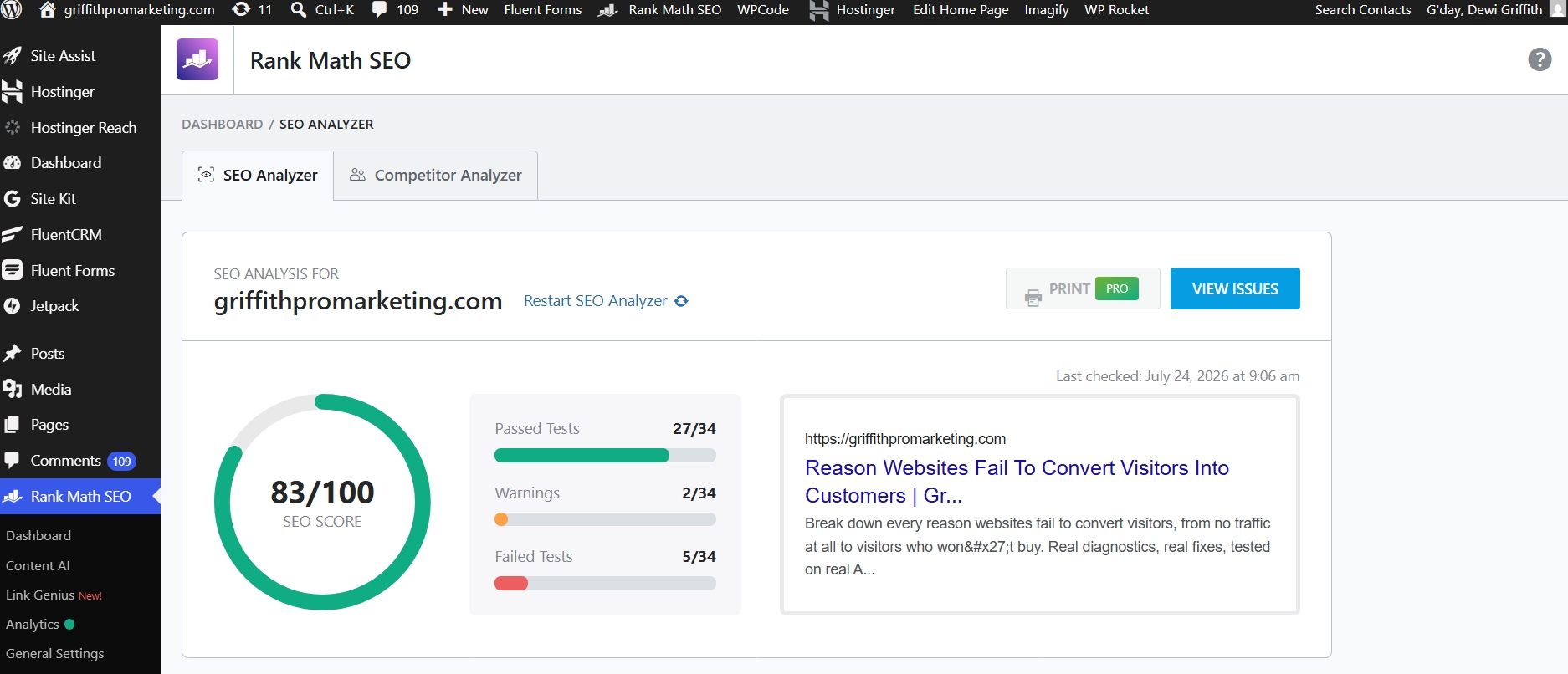
That screenshot is the actual moment this stopped being a Rank Math investigation. Everything the plugin could see, everything it was built to check, was now correctly configured. And the site still wasn’t moving the way it should have. That’s not a failure of the checklist above, it’s the checklist doing exactly what it’s supposed to do, which is rule things out, one at a time, until what’s left is the actual problem.
What Two Weeks of Waiting Actually Looked Like
I want to be honest about this part too, because “give it two weeks” sounds simple and isn’t. The pull to go back in and tweak one more setting on day four is real, and giving in to it is exactly how you end up unable to tell which fix actually worked, because you’ve stacked three of them on top of each other inside the same window. I set a calendar reminder, checked Search Console once at the start to log the baseline, and deliberately didn’t touch Rank Math’s settings again until the two weeks were up.
Impressions moved slightly, a small uptick consistent with fresher schema getting recrawled. Average position barely shifted, low 40s to high 30s across the same tracked pages, technically an improvement, nowhere near enough to explain a real change in traffic. That’s the result that actually mattered here: a real but small improvement is still evidence the plugin work wasn’t wasted, it just wasn’t the whole story.
The Moment It Actually Clicked
With the SEO layer genuinely clean, the obvious next suspect was hosting. Slow server response time is the classic hidden killer, the kind of thing that quietly caps every other fix you make. I went in expecting to find exactly that, a server struggling under load, and started testing TTFB directly rather than trusting a single PageSpeed number.
I found the opposite. Server response time was genuinely fine, fast even, repeated tests confirmed it wasn’t hosting dragging the site down at all. I’ve written up that specific test honestly, real numbers, not a summary, in the TTFB breakdown here, because the actual bottleneck turned out to be somewhere I hadn’t expected: render-blocking CSS, not the server, not caching, not Rank Math’s configuration. The page was technically fast to respond and slow to actually paint, a genuinely different problem with a genuinely different fix.
What made this findable at all was running the same PageSpeed test repeatedly rather than trusting one lucky or unlucky result. A single run can swing several points either way depending on server load at that exact second, which is exactly how people end up chasing noise. Running it five or six times back to back and looking at the pattern across those runs, not any single number, is what separated the real signal, consistently fast TTFB, consistently slow paint, from random variance.
That’s the part worth sitting with if you’re in the same spot. “SEO isn’t working” doesn’t mean “check SEO harder.” Once the SEO layer is actually clean, and I mean actually, not glanced-at clean, the next place to look usually isn’t back into the same plugin’s settings a fifth time. It’s outward, into layers that plugin was never built to touch in the first place.
Run the 21-point checklist. It covers content, caching, server response, and conversion as four separate layers, so you know definitively which one is actually broken instead of guessing, or worse, re-checking the one layer that was already fine.
The Stack, If You Want Rankings and Speed Together
Not a list of tools to dump on you, one coherent stack, each piece doing a specific job the others don’t touch, and each one only earning its place once the layer before it has actually been ruled in or out.
| Layer | Tool | Job |
|---|---|---|
| Content & structure | Rank Math | Titles, schema, sitemaps, on-page signals |
| Caching & assets | WP Rocket | File optimisation, caching, image handling |
| Server, if that’s the actual bottleneck | Cloudways | Managed cloud hosting, only worth it once you’ve confirmed this is the layer that’s broken |
Notice the order. Content and structure first, because it’s cheapest to fix and rules out the most common cause. Caching and assets second, since that’s usually where render-blocking problems like mine actually live. Hosting last, and genuinely only after testing proves it’s the actual bottleneck, not just the thing that feels like it should be the problem because it’s the most expensive fix on the list. Spending on hosting before confirming it’s broken is the single most common way to solve the wrong layer confidently.
What This Actually Means for Your Own Site
If you’re earlier in this process than I was, here’s the honest shortcut. Run the Rank Math setup checklist above properly, not from memory, actually open Rank Math’s settings and check each one against what’s really there, not what you remember setting six months ago. Give whatever you fix two full weeks before judging it, rankings don’t move on a schedule that matches your patience, and judging a fix after three days is how you end up convinced something didn’t work when it just hadn’t had time to yet.
If nothing’s moved after two clean weeks, stop looking at Rank Math and start testing TTFB and render performance directly, the same two tests that actually found my real bottleneck. Don’t skip straight to assuming it’s hosting either, that’s the trap I nearly fell into myself. Test first, spend second. A managed hosting upgrade is the most expensive item on the whole stack table above, and it’s wasted money if the actual problem turns out to be sitting in your CSS instead.
And if you’re further along than I was, already through a checklist like this once, it might genuinely be worth running it again. Settings drift. Tag pages accumulate. A theme update can quietly reset a title template without telling you, the way mine did. The checklist isn’t a one-time task with a permanent tick, it’s a periodic audit, and the version of it that actually helps is the one you re-run occasionally, not the one you did once and assumed still holds six months later.
The honest summary of this whole investigation is less exciting than a single silver-bullet fix, and more useful for exactly that reason. Two settings had drifted. Schema was uniformly wrong across content types. A handful of old tag pages were quietly indexed. None of that was the actual ceiling on rankings, the ceiling was render-blocking CSS, a layer Rank Math was never built to see. Both things were true at once, the plugin work was worth doing properly, and it still wasn’t the whole answer. That’s usually how it goes.
Where to Go From Here
Not Sure Which Layer Is Actually Broken?
Happy to talk through where your own site is likely losing points, no pressure, no sales pitch attached.
Get in Touch →