
Cloudways Review: What Actually Happens When Caching Isn’t Enough
I went into this expecting to write a very different article.
The plan was simple enough. Run the diagnostic on my own site, find a slow TTFB sitting underneath all the caching and image work I’d already done, then write the classic “I did everything else right and my host was still the ceiling” piece. It’s a good story. It’s also, as it turns out, not my story.
So here’s what actually happened instead.
Where this started
Griffithpromarketing.com is already running WP Rocket and Rank Math, and I’ve spent a fair bit of time on the content and caching side of things, most of it living under the Fix Website Speed work I’ve already published here. Before I went anywhere near a hosting decision, I wanted a real number, not a guess, on where my site was actually losing time. Server response time gets blamed for a lot of things it isn’t responsible for, and I didn’t want to be the guy who migrates hosts and writes three thousand words justifying a decision his own data doesn’t back up.
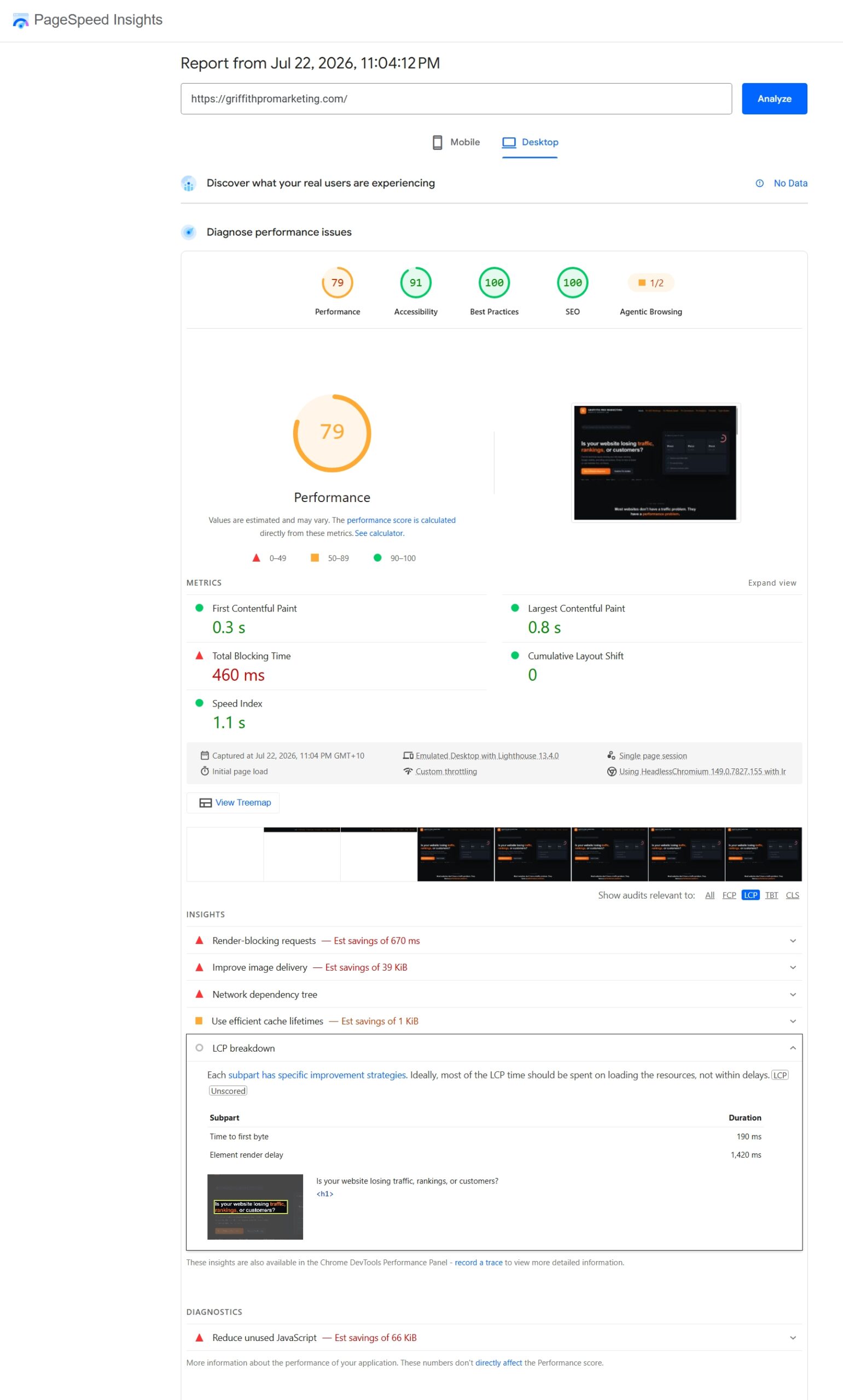
So I ran it properly. Not once, three separate times, spaced twenty to thirty minutes apart, both mobile and desktop, using PageSpeed Insights’ LCP breakdown to isolate Time to First Byte from everything that happens after the server responds.
Six readings later, the number hadn’t moved once: 190 milliseconds. Every single time, on both device types. For context, Lighthouse doesn’t even flag TTFB as a problem until it creeps past roughly 600ms, so my current Hostinger setup is sitting comfortably under a third of that threshold. That’s not a slow server. That’s a server doing its job.
What actually was slow
Here’s the part that surprised me. The same LCP breakdown that cleared my TTFB flagged something else entirely: Element Render Delay, the gap between the browser receiving the server’s response and actually painting the page’s headline on screen. Across the same three runs, that number sat anywhere from 1.4 to 2.8 seconds on desktop, and 1.4 to 3.0 seconds on mobile. Nearly double, low to high, without me touching a single setting between tests. It’s the same instinct that led me to dig into why this site had no Core Web Vitals data a while back, don’t trust the absence of a red flag until you’ve actually gone looking for what it might be hiding.
My server was handing the browser a fast, clean response in under 200 milliseconds, and then something downstream was sitting on it for over a second before anyone actually saw a headline.
That’s not a hosting problem. That’s a front-end one, render-blocking CSS or JavaScript, fonts loading late, scripts firing before the page has anything to show. I’ll be straightforward about what this means: if I published the “my TTFB was killing me until I switched hosts” article I originally sat down to write, I’d have been making something up. So I’m not writing that article. I’m writing this one instead. (I went and found the actual cause, render-blocking CSS specifically, and wrote up exactly what was happening and why, if you want the full technical breakdown: My TTFB Was Fine, My Site Was Still Slow.)
So why am I still switching?
Because TTFB isn’t the only reason to care about hosting, and pretending it is would be just as dishonest as pretending it’s slow when it isn’t. I’ve written before about how site speed affects conversions beyond just rankings, and reliability under load is part of that same conversation, just further along.
Cloudways runs as a managed layer on top of proper cloud infrastructure rather than shared hosting, giving you dedicated resources instead of splitting a server with however many other sites happen to be parked on the same box that week. The pitch that actually matters to me isn’t raw speed, it’s what happens under load. Shared hosting setups are notorious for buckling the moment traffic spikes, whether that’s a good week of organic search, a mention somewhere unexpected, or just normal growth catching a plan off guard, while a proper cloud setup like Cloudways is built with dedicated resources specifically to absorb that kind of spike without falling over.
That’s the actual case for me right now: not “my site is slow,” but “I’d like some headroom before I need it.”
There’s also the practical stuff that’s easy to undervalue until you’ve been burned by its absence. Here’s what’s actually bundled into every Cloudways plan as standard, not an upsell you discover you needed after something’s already gone wrong:
| Included as standard | Why it matters |
|---|---|
| Automated backups | Not an add-on you find out you needed after losing data |
| Server-level security & firewalls | Baseline protection, not a paid tier upgrade |
| Free SSL | Standard on every plan, entry-level included |
| Optimised server stack | Same core features whether you’re on the smallest or largest server |
| Pay-as-you-go pricing | No annual lock-in, no renewal price hikes |
Pricing-wise, entry plans on DigitalOcean-backed servers currently start somewhere in the low teens per month, scaling up depending on the provider and resources you pick, and there’s a short free trial with no credit card required if you want to poke around the dashboard before committing to anything. I’ll cover the actual tiers properly in a dedicated pricing breakdown rather than turning this into a spreadsheet, since the honest answer to “what does it cost” depends entirely on what you’re running.
What I’m not going to claim
I’m not going to tell you Cloudways is going to fix a slow website, because for mine, right now, it isn’t the thing that’s broken. If your own TTFB comes back high when you test it (and I’d genuinely test it before assuming, the same way I did), then hosting is a real, defensible reason to move. If it comes back fine, like mine did, and your render delay or your image weight or your plugin stack is where the real time is going, no amount of server upgrade fixes that. I’d be lying to you and to myself if I framed this as a rescue story.
What I can tell you honestly is that I’m migrating anyway, and I’ll be documenting the whole thing as it happens, the actual process, what breaks, what doesn’t, and a proper before-and-after on the numbers that are relevant, not the ones that make a better headline. That’ll land on the case studies page once it’s done.
For now: test your own TTFB before you take anyone’s word for where your bottleneck is, including mine, and the 20-point website checklist is a good place to start if you don’t know which layer of your site is actually the problem yet. If you’re on shared hosting and starting to feel the walls, Cloudways is worth a proper look, not because it’s the answer to everything, but because it’s a genuinely solid answer to a specific, real problem. Just so you know, that’s an affiliate link.
Dewi