
WordPress.com Add-Ons: Which of the Automattic Stack You Actually Need
Quick answer: out of the six official WordPress.com add-ons, most sites only need two. Jetpack covers security, backups, and stats. Akismet covers spam. The other four, Pressable, WooCommerce Marketplace, Sensei, and WP Job Manager, are single-purpose tools that only make sense once you’ve already got a store, a course, a job board, or a specific reason to move hosting. Here’s the honest, line-by-line breakdown, including what Automattic’s own pricing pages don’t put front and centre.
Automattic has built a genuinely wide add-on ecosystem around WordPress.com over the years, from basic spam filtering to a full learning management system for selling courses. That breadth is useful once you actually need one of the specialised tools. Until then, it just makes the dashboard’s “recommended plugins” list look more essential than it actually is.
I haven’t personally run all six of these the way I have with WP Rocket or Cloudways, where I’ve got real before-and-after numbers to show. This is a reasoned breakdown of what each one actually does and who genuinely needs it, built from checking current pricing and features properly rather than guessing, not a hands-on review claiming months of use I haven’t had. If that changes for any of these down the track, I’ll update the relevant section honestly rather than leave a stale claim sitting here.
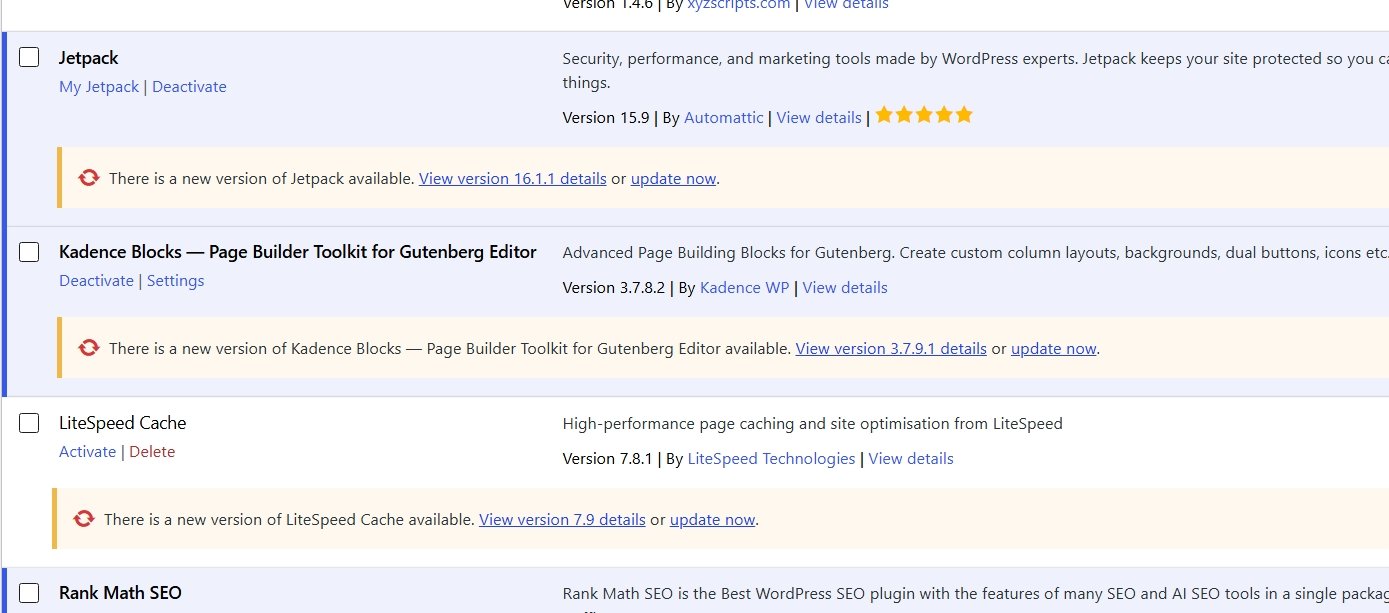
Worth flagging since it’s sitting right there in the screenshot: Kadence Blocks, LiteSpeed Cache, and Rank Math aren’t part of Automattic’s own ecosystem, so they’re outside what this particular page is sorting through. Rank Math specifically is the SEO plugin this whole site runs on, covered properly in its own setup guide rather than squeezed in here.
The Six WordPress.com Add-Ons, Sorted by Who Actually Needs Them
Before the full breakdown, here’s the same information as a straight comparison, useful if you just want the shape of the decision before reading each one in detail.
| Add-on | Who it’s for | Starting cost | Skip it if |
|---|---|---|---|
| Jetpack | Almost any real site | Free tier / ~$4.95/mo backups | You already run full security + backups elsewhere |
| Akismet | Any site with comments or a contact form | Free (personal) / ~$9.95/mo | No comments, no forms, genuinely private site |
| Pressable | Automattic-ecosystem loyalists | Managed hosting pricing, check current plans | You’re happy on your existing host |
| WooCommerce Marketplace | Anyone selling products | Core free, extensions vary | You’re not running a store |
| Sensei | Anyone selling structured courses | Free core / paid Pro annual | Courses aren’t part of the business |
| WP Job Manager | Job board sites specifically | Core free, add-ons priced individually | No job listings on the site |
Automattic’s own security, backup, and stats plugin, essentially the official toolkit for keeping a WordPress site safe and monitored without stitching together several separate tools.
Almost anyone running a real site benefits from the security and backup layer at minimum. The stats and CDN features are a genuine bonus on top, though if page speed specifically is the goal rather than security, a dedicated caching plugin will get you further, see the WP Rocket review for what that actually looks like.
Typical cost: a genuinely usable free tier exists, with paid backup starting around $4.95/mo and a fuller security bundle (malware scanning plus Akismet) from roughly $9.95-20/mo depending on the bundle, billed yearly.
Check Jetpack →Jetpack covers security. For actual page speed, this is the plugin doing the work on this site:
Spam filtering for comments and contact form submissions, built by the same team as WordPress itself.
Any site with comments open or a public contact form. Spam is a genuine time sink without something filtering it, and this is the standard, well-established option.
Typical cost: free for genuinely personal, non-commercial sites. Once there’s any commercial activity on the site, including affiliate links, expect roughly $9.95/mo for the Pro tier, scaling up toward $49.95/mo for business use.
Worth knowing specifically: Akismet’s own terms count affiliate links as commercial activity, so a site like this one, with genuine affiliate content, wouldn’t actually qualify for the free personal tier.
Check Akismet →Managed WordPress hosting from Automattic, an alternative to WordPress.com’s own built-in hosting, or to something like Hostinger or Cloudways.
Worth considering if you want to stay within the Automattic ecosystem specifically rather than mixing providers. If you’re not already invested in that ecosystem, Hostinger or Cloudways are the tested alternatives on this site. Whichever host you’re weighing, it’s worth testing your actual TTFB first, since “which company” and “is hosting actually my bottleneck” are two different questions.
Typical cost: priced as managed WordPress hosting, so expect a meaningfully higher starting point than budget shared hosting, check their current plans directly since managed-hosting pricing shifts more often than plugin pricing does.
Check Pressable →Official extensions for WooCommerce, WordPress’s ecommerce plugin, payment gateways, shipping calculators, subscription billing, and similar add-ons.
Only relevant if you’re actually running a store. If you’re not selling physical or digital products, skip this entirely, it solves a problem you don’t have.
Typical cost: the core WooCommerce plugin itself is free, individual extensions from the marketplace are priced separately, some one-time, some annual subscriptions, so cost depends entirely on which specific extensions your store actually needs.
Browse WooCommerce →A learning management system plugin, built for selling and hosting online courses directly from a WordPress site rather than a separate platform.
Genuinely niche, only worth it if course delivery is actually part of your business. If you’re not teaching anything structured, this isn’t for you.
Typical cost: a free core version exists, with the paid Pro tier priced as an annual subscription, worth the specific investment only if courses are a genuine, ongoing part of the business rather than a one-off idea.
Check Sensei →A plugin specifically for building and managing a job listings board on a WordPress site.
The narrowest use case on this list. Only relevant if job listings are literally part of what your site does. Everyone else can skip it entirely.
Typical cost: the core plugin is free, with paid add-ons (resume manager, WooCommerce paid listings, and similar) priced individually or bundled, again only worth pricing out once you’ve confirmed a job board is genuinely part of the plan.
Check WP Job Manager →How to Actually Decide Which Ones You Need
Start by asking what your site actually does, not what it could theoretically do one day. If you’re running a straightforward business or content site with no store, no courses, and no job listings, you genuinely only need to think about two of these six.
Quick decision checklist
- Normal content or business site, no store, no courses, no job board → just Jetpack + Akismet.
- Selling products → add WooCommerce Marketplace extensions as your store actually needs them.
- Teaching paid or structured courses → add Sensei.
- Running a job board → add WP Job Manager.
- Want everything inside one company’s ecosystem, hosting included → consider Pressable, otherwise stick with your existing host.
If you go paid tier on both baseline tools, Jetpack’s backup at roughly $4.95/mo plus Akismet’s Pro tier at roughly $9.95/mo works out to about $15/month total for backups, security scanning, and spam filtering combined. That’s the realistic starting budget for the two add-ons almost every site actually needs, before touching any of the niche four.
The trap to avoid is the opposite one: installing WooCommerce extensions “in case I start selling something,” or Sensei “in case I build a course eventually.” Add the tool when the actual need shows up, not before, the same logic that applies to hosting and caching plugins applies here too. If your business does involve one of the specific use cases, the decision gets easier, not harder, since at that point there’s a clear yes rather than a vague maybe.
Common Questions
Do I need Jetpack if I’m already using a separate security plugin?
Not necessarily both. If you’ve already got a security plugin you’re happy with, Jetpack’s backup and stats features can still be worth it on their own, but there’s no need to run two full security suites side by side.
Is Akismet actually worth paying for if spam isn’t a big problem yet?
If your site is genuinely personal and non-commercial, the free tier likely covers you already. The moment there’s any commercial activity, including affiliate links, it’s worth paying for properly rather than technically breaching the free tier’s terms.
Should I use Pressable instead of Cloudways or Hostinger?
Only if staying inside the Automattic ecosystem specifically matters more to you than anything else. On pure testing, Hostinger and Cloudways are the two I can actually speak to firsthand, Pressable isn’t a worse option, it’s just one I haven’t personally run yet.
Can I add WooCommerce, Sensei, or WP Job Manager later if my business changes?
Yes, genuinely, none of these need to be decided on day one. They’re all addable later without restructuring the site, so there’s no advantage to installing them speculatively now over waiting until the actual need shows up.
What if I’m not sure which category my site actually falls into?
That’s more common than it sounds, particularly for a site that started as a blog and slowly grew a small shop, or added courses as an afterthought. If you’re genuinely unsure, the honest move is to hold off on the specialised tools until you can answer plainly: is this an actual, ongoing part of the business, or something I’m considering. “Considering” doesn’t need a plugin installed yet, it needs a decision made first.
This add-on list makes more sense once the actual site exists, and once you’ve got a clearer sense of what kind of business it actually is, content, store, courses, or something else entirely. Start here if you haven’t built anything yet, or sign up to WordPress.com directly if you already know that’s the route you want. Either way, come back to this list once the site itself exists, rather than trying to pre-plan every add-on before you’ve published a single page.
Not Sure What Your Site Actually Needs?
Happy to talk through which of these genuinely apply to your situation, no pressure, no sales pitch attached.
Get in Touch →