
My Site’s Real Core Web Vitals After WP Rocket (Mobile vs Desktop, No Cherry-Picking)
Here are my real Core Web Vitals after installing WP Rocket, numbers I pulled directly from Google, not from a plugin dashboard. Search Console itself couldn’t tell me anything yet, not enough real visitor traffic for it to report field data, which I wrote about separately in why my site had no Core Web Vitals data. So instead I went straight to the lab test. When I published my WP Rocket case study, the number I led with was 718 milliseconds, the LCP reading straight from WP Rocket’s own Rocket Insights dashboard. That number is real, but it’s also only half the picture, and I want to show you the other half instead of quietly leaving it out.
Rocket Insights runs a single desktop-focused test through GTmetrix. It’s a legitimate tool, but it’s not the same as what an actual visitor experiences on their phone, on a real connection, with real throttling. So I went to Google’s own PageSpeed Insights and ran my homepage through it directly, no plugin dashboard in between, just Google testing my live site the way it would test anyone’s.
The Desktop Result: Genuinely Excellent
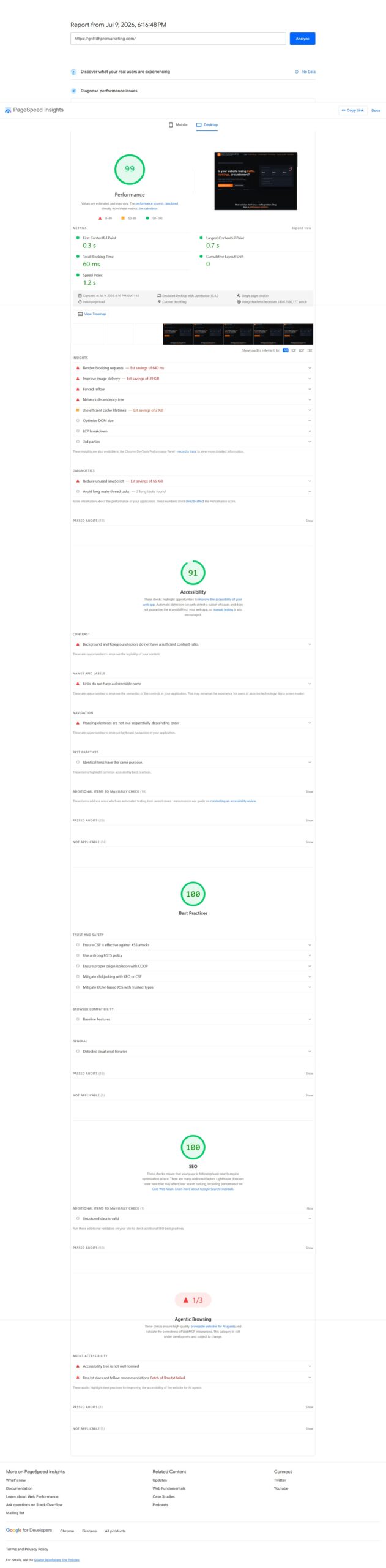
Desktop came back at 99 out of 100 for performance. First Contentful Paint landed at 0.3 seconds, Largest Contentful Paint at 0.7 seconds, Total Blocking Time at 60 milliseconds, and Cumulative Layout Shift at a flat 0. Every single metric came back green. This lines up closely with what Rocket Insights was already showing me, so at least on desktop, the two tools agree.
The Mobile Result: Where the Real Work Still Is
Mobile is a different story, and I think this is the part worth actually paying attention to rather than skipping past. Performance came back at 88, still a solid score, but noticeably behind desktop.
First Contentful Paint sat at 2.5 seconds, Largest Contentful Paint at 3.4 seconds, and Speed Index at 3.3 seconds. Total Blocking Time and Cumulative Layout Shift both stayed green, at 30 milliseconds and 0 respectively. The page isn’t janky or unstable, it’s just genuinely slower to first paint on a throttled mobile connection than it is on desktop.
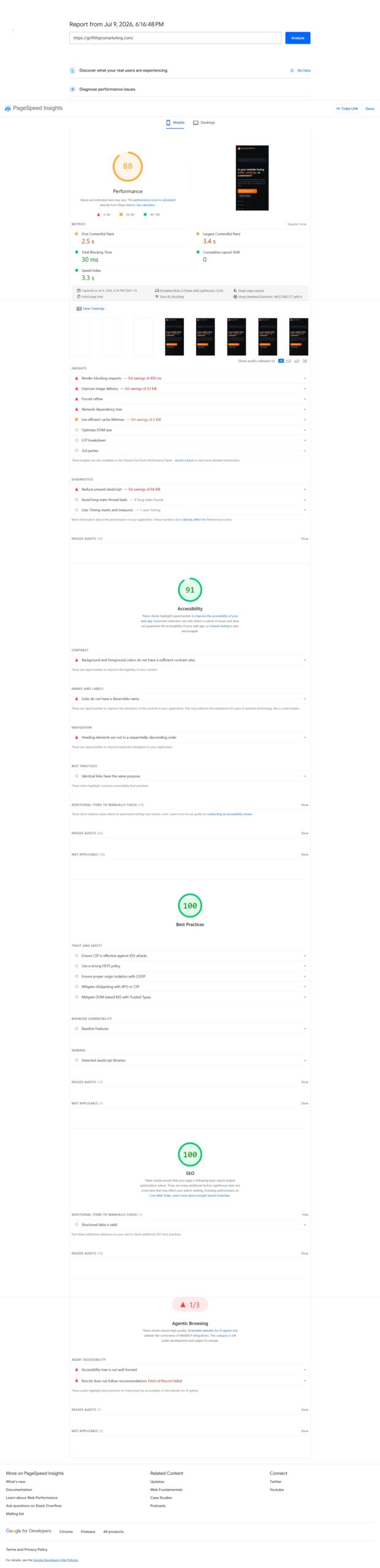
That 3.4 second mobile LCP is nearly five times slower than the desktop LCP of 0.7 seconds. If most case studies about a speed plugin only show you the best number from the best test, this is exactly the kind of gap that gets quietly left out.
I’d rather show it, because if you’re reading this while deciding whether to install WP Rocket yourself, you deserve to know that a caching plugin alone doesn’t automatically close the gap between desktop and mobile. It closes part of it, and the report itself points at what’s still open.
What PageSpeed Insights Says Is Still Costing Me
The report doesn’t just hand you a score, it tells you where the remaining time is going, and mine flagged a few consistent culprits on both mobile and desktop. Render-blocking requests were the biggest one, estimated at 450 milliseconds of potential savings on mobile and 640 milliseconds on desktop, meaning there’s CSS or JavaScript loading in a way that delays the page from painting anything at all until it finishes.
Image delivery came up too, with an estimated 22 KB of savings on mobile and 39 KB on desktop, suggesting some images could be compressed or served in a more efficient format. There’s also an unused JavaScript flag, roughly 64 to 66 KB worth, code being downloaded that isn’t actually needed for that page.
None of these are WP Rocket’s fault exactly. They’re mostly about theme choices, image handling, and what scripts are loading regardless of caching. WP Rocket got the caching and JavaScript timing layer sorted, which is exactly what closed most of the gap I already had. What’s left now is a theme and asset-level conversation, not a plugin-level one.
Why I’m Showing You the Imperfect Number
It would have been easy to just screenshot the desktop 99 and call it a day, since that’s the number that looks best. But if you’re trying to decide whether a speed fix is worth doing on your own site, the honest answer is more useful than the flattering one.
WP Rocket took a 4.1 second load time down to something genuinely fast on desktop and meaningfully improved on mobile too, without me touching a single line of code, just the settings I walked through here. That’s a real result. It’s just not a finished one, and pretending otherwise wouldn’t help anyone reading this make a good decision.
If you haven’t seen how this all started, here’s the mistake that got me into this in the first place, including the LiteSpeed Cache conflict and the actual install process.
What’s Next
If your own site has the same shape, TTFB that’s already fine but LCP still dragging on mobile, that’s not a caching problem anymore, WP Rocket has done what it can. Here’s the fuller diagnosis on render delay specifically, the same gap this post is describing, just walked through in more depth.
The mobile gap is now the thing I’m actually working on, mostly around trimming render-blocking requests and reviewing image formats, separate from anything WP Rocket controls. Core Web Vitals aren’t a one-time fix, they’re something you keep an eye on as your theme and content change, so I’ll report back on this once there’s something real to show, rather than promising a number I haven’t hit yet.
WP Rocket got my desktop to 99. If your site’s still slow, this is where I’d start too.
Get WP Rocket →