
Website Builder vs WordPress: I’m Running Both Right Now
Most “builder vs WordPress” content is written by someone who picked one and never seriously used the other. I’ve got both live at the same time, one badly neglected, one properly built out. Here’s the honest, unflattering comparison.
The neglected one: thestrategyreach.com
This one’s built on Hostinger’s own website builder, and I’ll say upfront, it’s not a fair fight, because I never finished it. There’s a section on the live homepage right now that’s just an empty blue placeholder box, nothing in it, no image, no text. I know it’s there. I haven’t gone back to fix it.
That’s genuinely all the traffic it gets, and it’s honestly about what an unfinished, unpromoted site deserves. The headline that is live says “Stop Guessing Your Marketing. Start Using What Works,” with a line underneath about ready-to-use social media, email, and campaign templates. It’s a reasonable idea. It’s just sitting there half-built.
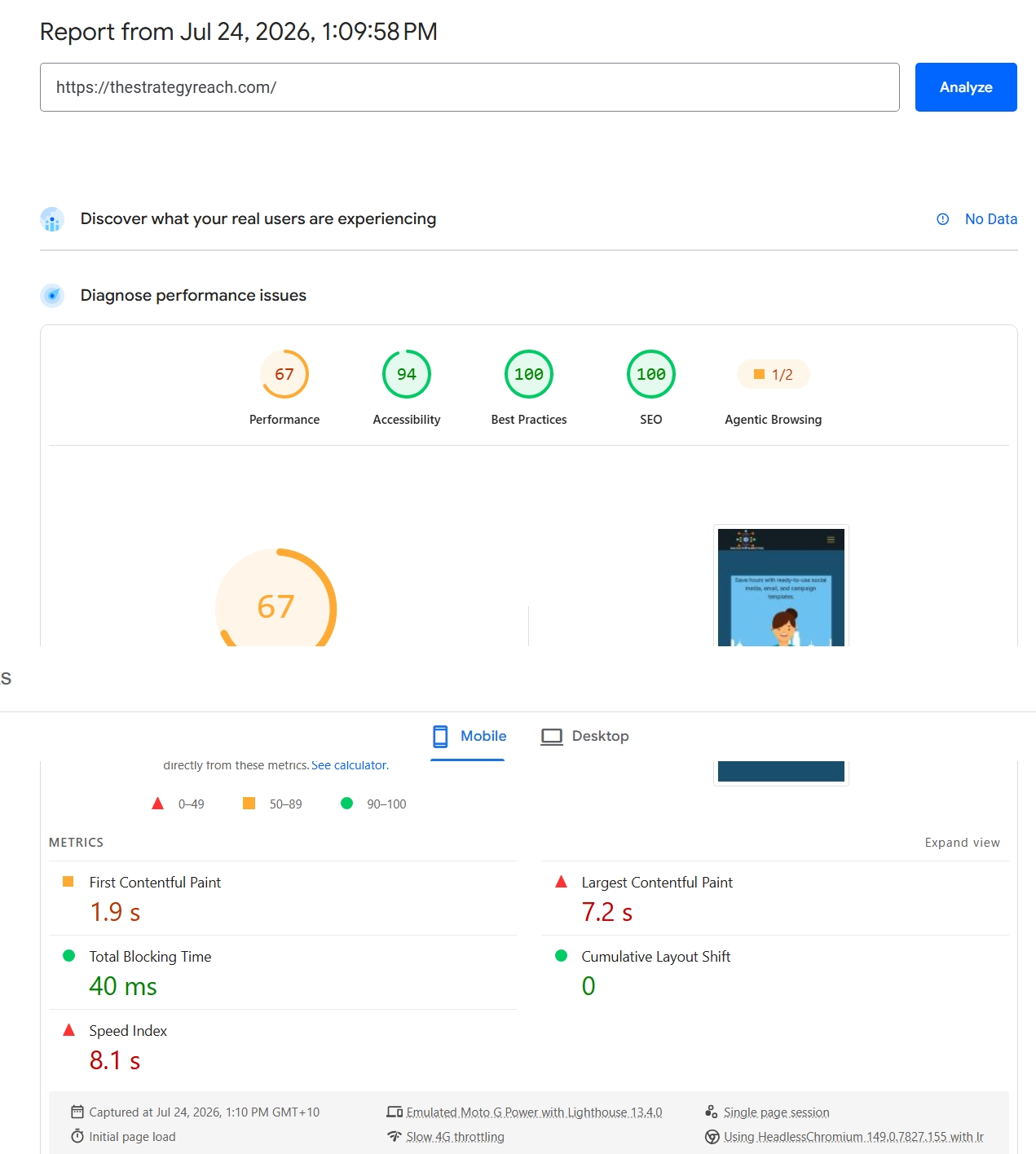
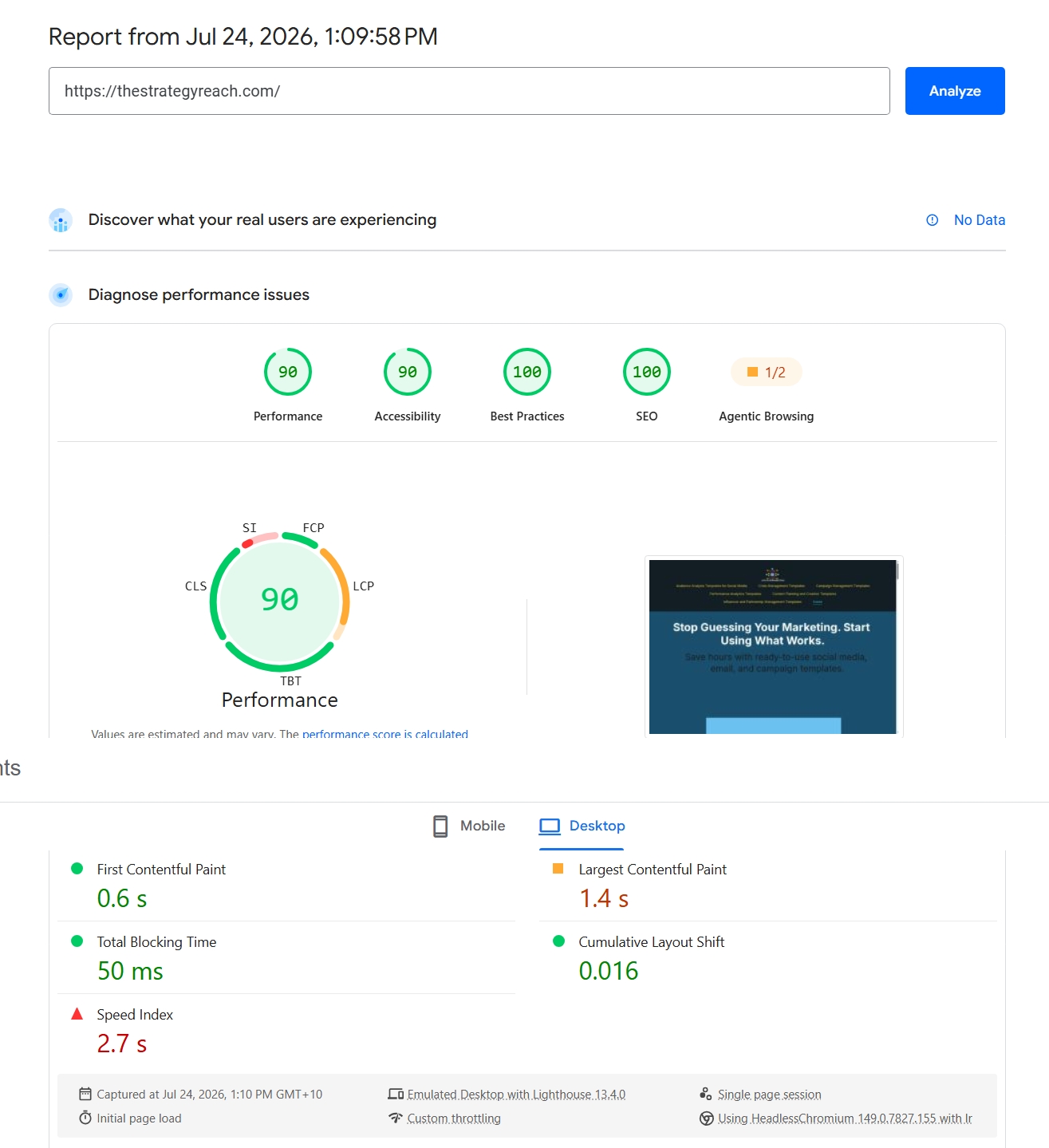
Here’s where my own assumption walking into this got proven wrong, worth saying plainly rather than quietly fixing it after the fact. I expected a near-empty page with one placeholder box and barely any content to test fast, simply because there’s so little on it. It didn’t. Mobile LCP on this half-built builder page came back at 7.2 seconds, actually slower than the fully-built WordPress site further down this post.
What I’ll say in the builder’s defence: none of this is the builder’s fault. The editor itself is straightforward, drag, drop, edit text inline, no theme fighting you, no plugin conflicts. The problem was entirely me not finishing what I started, not any limitation in the tool.
The one I actually built out: earlychildhoodedu.net
This is WordPress, also through Hostinger, and it’s the one I’ve actually put real time into. Full navigation, Literacy Skills, Math Skills, Fine Motor Skills, Child Development, Preschool Activities for Home, Printables, a Blog, a clear niche, a clear audience, a homepage that says exactly what it’s for in the first line: “Play-Based Learning Activities & Resources for Preschool Children.”
Here’s where it gets genuinely interesting though, and it’s not the flattering WordPress-always-wins story you might expect.
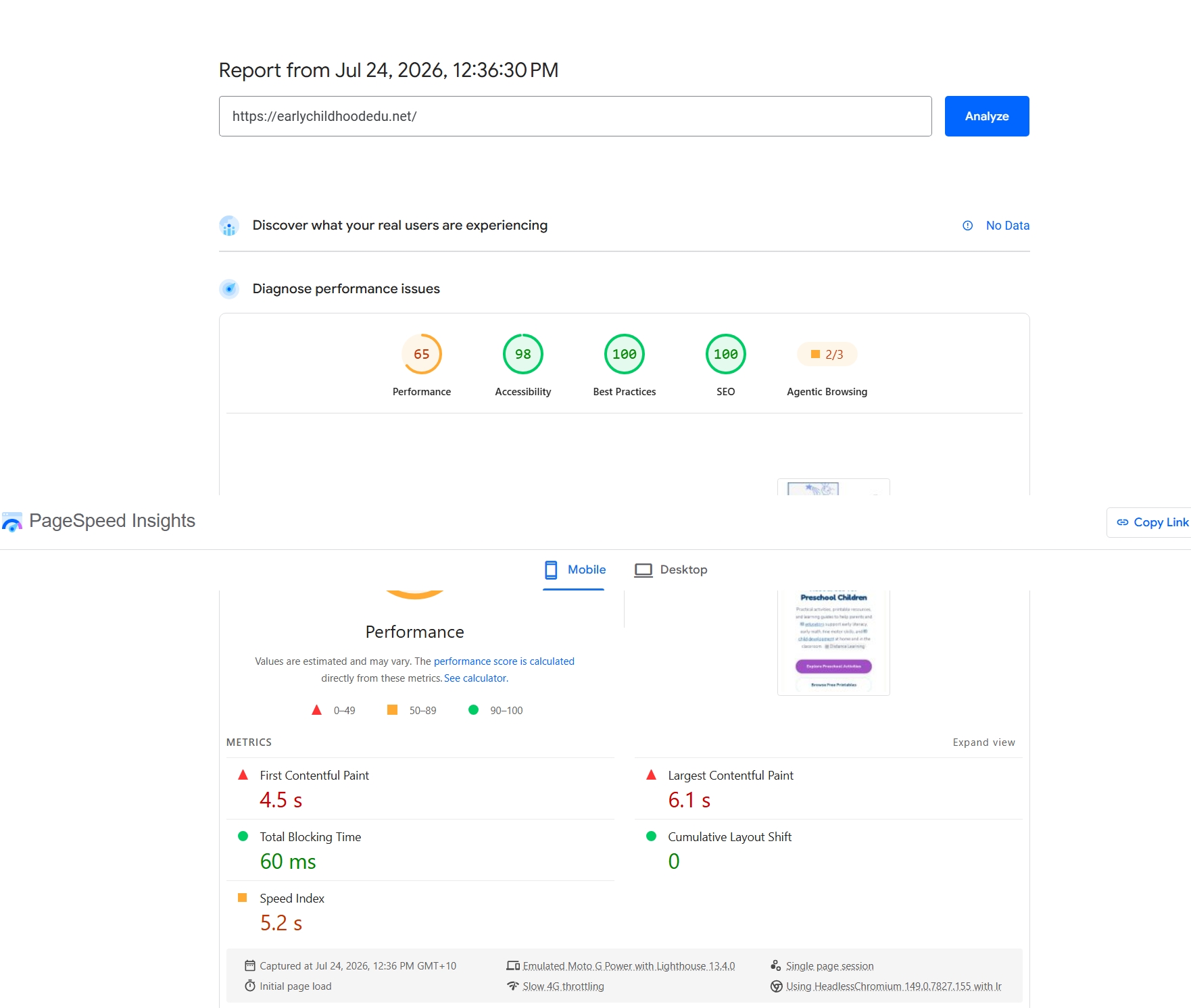
That’s the thing nobody tells you when they’re selling you on WordPress over a builder. WordPress gives you control, real control, over structure, content, and growth. It does not automatically give you a fast site. This site has a clear niche, real content depth, and a proper nav, and it’s still taking over six seconds to paint its largest element on mobile. Something’s slowing it down, unoptimised images, no caching configured properly, render-blocking assets, the exact kind of thing I’ve written about finding on my own main site too.
A big mobile-versus-desktop split like this is usually a caching and asset problem before it’s anything more complicated. WP Rocket is the first thing I’d check, and if you want to understand the actual mechanics of what’s slowing a page down after that, this breakdown of TTFB versus render delay covers exactly this kind of gap on a different site.
Side by side, the desktop numbers land close together, 90 for the builder, 89 for WordPress, basically a wash. But mobile tells a different story: 67 versus 65 on the topline score looks similar, until you look at LCP specifically, 7.2 seconds on the builder against 6.1 seconds on WordPress. The site with almost nothing on it painted its main content slower than the one with a full nav, real content depth, and years more complexity sitting on top of it.
I don’t have a fully confirmed reason why, since I haven’t dug into the builder’s actual asset loading the way I have with WordPress, but it lines up with something worth remembering regardless of platform: an unfinished page isn’t automatically a lean, fast page. Whatever’s rendering that empty placeholder box and the rest of the builder’s template scaffolding is doing real work on the way to painting the screen, even with barely any content behind it.
What this actually tells you
Not “WordPress is better” and not “builders are worse.” What it actually shows is that the platform isn’t the thing that determines whether a site is good. Attention is. Thestrategyreach.com is unfinished because I neglected it, not because the builder failed me. Earlychildhoodedu.net is well-structured because I put real work into the content and navigation, and it’s still slow on mobile because I haven’t put the same effort into its technical side yet.
- You genuinely just need a simple, working site
- You don’t want to think about plugins, themes, or hosting separately
- You’ll actually finish and maintain it, unlike me with this one
- You want real control over structure and content depth
- You’re building something you intend to grow seriously
- You’re willing to also learn the technical side, caching, speed, hosting, not just the writing
If you’re on a builder right now and it’s doing the job, genuinely, that’s a fine place to stay. The pressure to “graduate” to WordPress isn’t universal advice, it’s advice for people who’ve actually outgrown what a builder can do for them. Check the 21-point checklist if you’re not sure which camp you’re in, it’ll tell you honestly rather than assume WordPress is always the answer.
I’m documenting both of these sites, and the third rung of this same ladder, griffithpromarketing.com itself moving to Cloudways, on the website experiment page, updated as things actually change rather than written up after the fact.
Want a Second Pair of Eyes on It?
Happy to talk through where your own site is likely losing points, no pressure, no sales pitch attached.
Get in Touch →