
Why Your Website Is Not Ranking on Google: The Full Diagnostic and Fix Guide
Most SEO problems aren’t random. They come from predictable breakdowns in how Google evaluates your site, your pages, and your structure.
This page identifies the real reason your website is not ranking on Google, then points you to the exact fix. No theory. No guesswork.
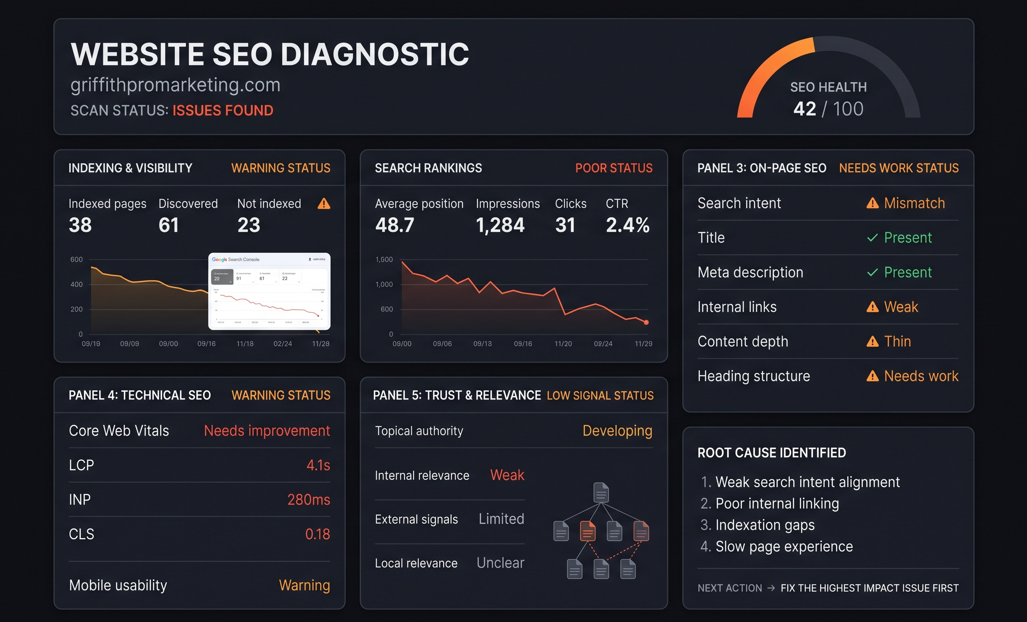
Before You Fix Anything, You Need to Diagnose the Real Problem
If you’re wondering why your website is not ranking on Google, the answer is rarely one SEO problem. Google evaluates websites across multiple layers: indexing and visibility, ranking stability, on-page fundamentals, and overall trust. If you fix the wrong layer, nothing changes.
When a website isn’t getting traffic from Google, the instinct is usually to rewrite content, add more blog posts, or chase backlinks. Sometimes that’s the right move. Often it isn’t. Before spending time on any of that, it’s worth understanding exactly where in Google’s evaluation process your site is failing, because the fix for a page that isn’t indexed is completely different from the fix for a page that ranks on page four, or one that ranked well for a few weeks and then vanished.
Google doesn’t rank a website. It ranks individual pages, based on a layered set of checks that happen roughly in this order: can the page be found and indexed, does it match what people are actually searching for, is it structured well enough to be understood, and does the site around it have enough trust and relevance to support that ranking. For the full technical breakdown straight from Google, their own guide to how Search actually works covers the crawling, indexing, and serving pipeline in detail. Skipping ahead, polishing content on a page Google hasn’t even indexed, is one of the most common reasons fixes don’t work.
This page breaks that down clearly so you can go straight to the right fix. Pick the layer that matches your symptoms, follow the linked diagnostic, and you’ll usually land on the specific, fixable cause within a few minutes.
Why Your Website Is Not Ranking on Google
There are four broad categories that explain almost every case of a website not ranking on Google. Most sites fall cleanly into one, though it’s common for a struggling site to have small issues across two or three. Work through the categories below in order. If your site isn’t appearing in search results at all, start with indexing and visibility. If it shows up but never climbs, or drops after climbing, ranking instability is the more likely cause. If pages are indexed and stable but simply weak, the fundamentals section below will apply. And if you’ve already ruled out the technical stuff, the last category, trust and local relevance, is usually what’s left.
Indexing & Visibility Problems
Even a real, published website can stay invisible to Google if individual pages aren’t structured to be found and indexed. If you’ve checked your content and it still doesn’t explain why your website is not ranking on Google, this is usually the layer to rule out first, because no amount of content quality matters if Google hasn’t crawled and indexed the page in the first place.
Ranking Instability
Some sites do get ranked, then lose it just as fast. That instability comes from a specific, fixable set of causes, and it’s one of the more confusing versions of why your website is not ranking on Google, since it looks like the site was working before. New sites are especially prone to this while Google is still deciding how much to trust them, which can look alarming if you don’t know what’s actually happening.
SEO Fundamentals You’re Missing
Weak on-page structure and unclear site architecture quietly cap how well any page can rank. When this is the actual reason why your website is not ranking on Google, it rarely looks dramatic, it’s just a page that never quite climbs. These aren’t flashy fixes, but they’re often the difference between a page that ranks on page one and one that stalls just outside it.
How Google Evaluates Trust & Local Relevance
Google decides whether your site deserves to rank based on trust, relevance, and local signals, not just content quality. This is the layer most site owners skip straight past, even though it’s frequently the actual, overlooked reason why your website is not ranking on Google, even after everything technical checks out.
Most Common Reasons Websites Don’t Rank
Across the sites we’ve audited, the specific reasons a website doesn’t rank tend to repeat. Below are the patterns we see most often, roughly in order of how frequently they show up. If you only have time to check one thing today, start at the top of this list, it accounts for a disproportionate share of the cases we’re asked to look at when someone asks why their website is not ranking on Google.
None of these are unusual or rare. They’re the standard set of issues that show up on almost every underperforming website, which is exactly why they’re worth ruling out systematically instead of guessing. Each one links through to a full breakdown of the cause and the fix.
Why Your Website Is Not Ranking on Google Yet, Even After a Fix
One of the most common follow-up questions after diagnosing why your website is not ranking on Google is how long the fix will take to show up in Search Console. The honest answer depends on which layer was broken.
Indexing issues are usually the fastest to resolve. Once a page is fixed and resubmitted, Google typically recrawls it within a few days to two weeks, though a full reindex of a larger site can take longer. Ranking instability tied to new-site trust is slower, sites often need two to four months of consistent signals before rankings settle, which is one reason new websites feel stuck even when nothing is technically wrong.
Fixes to on-page fundamentals, better structure, clearer intent matching, stronger internal linking, tend to show partial movement within a few weeks, with the full effect building over one to three months as Google re-evaluates the page relative to competitors. Trust and local relevance fixes are the slowest of the four, often taking three to six months, because they depend on signals accumulating over time rather than a single change.
This is why diagnosing the correct layer first matters so much. Applying the right fix to the wrong problem doesn’t just waste time, it can make it look like SEO doesn’t work at all, when really the wrong lever was pulled.

Same four-layer model covered above: indexing, ranking stability, on-page fundamentals, and trust, checked in that order rather than guessed at all at once.
The Fix System
Step 1: Diagnose the Problem
Identify why your website is not ranking on Google using real symptoms, not generic checklists. Guessing at causes is the single biggest time-waster in SEO work, so this step alone often saves weeks.
Use the diagnostic checklist →If your rankings or traffic specifically dropped after doing well, this interactive tool walks you through it directly.
Run the ranking drop diagnostic →Step 2: Understand the Cause
See which of the four causes above actually applies to your site, since knowing why your website is not ranking on Google matters more than just knowing that it isn’t. Most sites map cleanly onto one of these four, though a few will show overlapping symptoms across two.
Review the core causes →Step 3: Fix the Right Layer
Apply the correct fix from the linked article, then use the tools below if the fix is technical. Some fixes are a content or structure edit you can make yourself in an afternoon; others need a plugin, a hosting change, or a developer, which is what the tools below are for.
Jump to tools →Tools That Fix These Problems
Once you know why your website is not ranking on Google, some of the causes are content and structure problems you fix by hand. Others are technical. When a tool genuinely makes the job easier, these are the ones we use. We don’t list tools here just to pad out a page, each one maps to a specific cause covered above, speed and Core Web Vitals, on-page SEO and schema, or hosting and infrastructure, so you can go straight to whichever one matches your diagnosis instead of installing everything at once.
If tracking down why your website is not ranking on Google pointed you at a technical cause, this is the section worth reading closely before you spend money anywhere else.
WP Rocket
If your homepage or service pages are slow to load, improving their performance can help create a better experience for visitors and support your broader SEO work. WP Rocket is the caching plugin we use when working on WordPress speed.
Get WP Rocket →Rank Math
If your on-page SEO, schema, or internal linking setup needs work, Rank Math is what we use to organise and manage those elements inside WordPress.
Get Rank Math →WordPress.com / Pressable
If testing shows that your hosting environment is contributing to slow performance or reliability problems, changing hosting can be worth considering. This is one of the hosting options we recommend investigating.
See WordPress.com →Some links on this page are affiliate links. We only recommend tools we actually use to fix these exact problems.
Frequently Asked Questions About Why Websites Don’t Rank
Why is my website not ranking on Google at all, not even for my own business name?
If your site doesn’t appear even for a branded search, that’s almost always an indexing problem rather than a ranking one, and it’s one of the more binary versions of why your website is not ranking on Google, either the page is in Google’s index or it isn’t. Google may not have crawled the page yet, or something is actively blocking it, like a stray noindex tag or a robots.txt rule left over from development. Start with the indexing and visibility section above before touching anything else.
I fixed my SEO issues. Why hasn’t my ranking improved yet?
Because none of the four layers move instantly. Depending on which one you fixed, expect anywhere from a few days to several months before the change is fully reflected, as covered in the timeline section above. Checking Search Console daily in week one won’t tell you much either way.
Is why your website is not ranking on Google usually a content problem or a technical problem?
In our experience it’s technical or structural more often than it’s content quality. Plenty of thin, average content ranks fine because the technical foundation is solid and Google trusts the site. Plenty of genuinely well-written pages sit invisible because of an indexing or structural issue underneath them.
Can I fix this myself, or do I need to hire someone?
A good portion of the causes above, page structure, internal linking, matching search intent, are things most site owners can fix themselves once they know why your website is not ranking on Google in the first place. Technical issues involving hosting, caching, or schema markup are usually faster and safer to hand to someone who does it regularly.
How do I know which of the four causes applies to my site?
Start with what you’re actually seeing. Nothing showing up at all points to indexing. Rankings that appear then vanish point to instability. Pages that rank but stay stuck on page two or three usually point to on-page fundamentals. And a technically clean site that still underperforms locally points to trust and relevance.
What’s the fastest way to explain why your website is not ranking on Google to a client or business partner?
Keep it to the four-layer model above: can the page be found, is it stable once found, is it built well enough to compete, and does the site have enough trust behind it. Most non-technical people follow that far more easily than a list of individual SEO factors.
Real Examples of Why a Website Is Not Ranking on Google, and How It Was Fixed
See how real websites recovered from ranking issues by fixing the correct layer instead of guessing. Each case study documents the actual Search Console data before and after, why your website is not ranking on Google in that specific case, and the specific fix that was applied, not a generic before-and-after screenshot with no context.
View Case StudiesReady to Fix Why Your Website Isn’t Ranking on Google?
Whichever cause matches your situation, the fastest path forward is to start with the diagnostic that fits your symptoms rather than trying to fix everything at once. Most site owners see the clearest early wins by starting with their homepage, since that’s frequently where why your website is not ranking on Google turns out to be most avoidable, and it usually carries the most authority on the site.